Start here
Getting Started
The shortest path from installation to a useful Marine Barometer setup.
1. Install and check the pressure sensor
Install the APK and open Marine Barometer. The Barometer and Altimeter require a built-in barometric pressure sensor. If the device does not have one, Marine Barometer will indicate that pressure data is unavailable.
2. Set the Barometer reference elevation
Marine Barometer measures the pressure where the phone is, then uses a reference elevation to calculate the sea-level pressure shown on the Barometer. Before judging the Barometer reading, make sure the reference elevation is appropriate for where the phone is being used.
Use a Saved Place
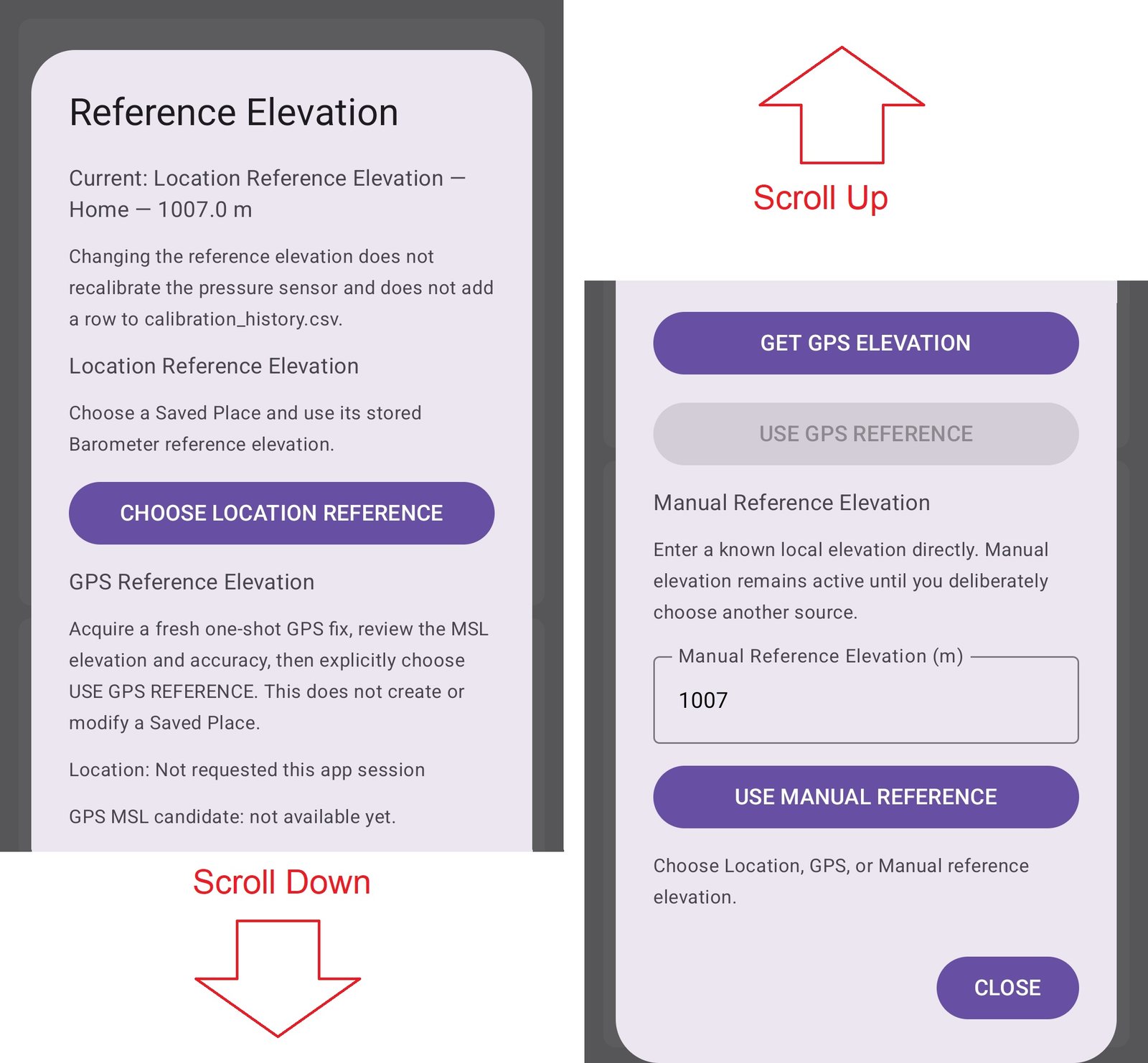
Open REFERENCE ELEVATION and choose Location Reference Elevation. This takes you to Location & Places, where you can select the Saved Place whose elevation you want the Barometer to use.
If the Place does not exist yet, create it in SETTINGS → LOCATION. A Saved Place can contain a name, reference elevation, latitude and longitude. In v1.9.10 the latitude and longitude can be entered or edited manually, or copied from a fresh GPS fix.
Use GPS elevation temporarily
Open REFERENCE ELEVATION and choose GPS Reference Elevation. Marine Barometer obtains a fresh one-shot GPS fix and shows the MSL elevation and vertical accuracy when Android provides it. Review the result, then press USE GPS REFERENCE.
This changes the Barometer reference elevation for the current situation; it does not create or modify a Saved Place.
Enter a known elevation manually
Open REFERENCE ELEVATION and choose Manual Reference Elevation. Enter the known elevation and accept it. The manual value remains authoritative until you deliberately choose another reference source.
3. Check the Barometer reading
Once the reference elevation is correct, compare the Barometer with a trustworthy nearby weather or aviation pressure report if you wish. Small differences are normal. If absolute agreement matters, use the Calibration Instrument; calibration is optional for ordinary pressure-trend watching.
4. Choose the second instrument
The Barometer is the primary instrument. The other instrument position can display the Altimeter, Pressure Trend, Clock or Tide Clock. Use the instrument selector in the app to choose the one you want to see.
5. Start Graphing if you want pressure history
Graphing and CSV logging are separate. Routine Graphing maintains the rolling Barograph history without requiring a dated CSV file. When you start Graphing from OFF, Marine Barometer asks whether you also want a CSV log for detailed testing or archival use.
6. Use Lock Barometer for a short trip
If you are about to walk or drive through a significant change in elevation and want the Barometer to continue showing the starting weather pressure, open SETTINGS → LOCK BAROMETER.
Marine Barometer captures the current Barometer reading, initializes the Altimeter for the excursion, and holds the Barometer value for up to 60 minutes. A small six-sector timer appears only while the lock is active. Unlock early by touching the timer, or let it expire automatically.
7. Set the other instruments only if you need them
The Altimeter provides QNH, QFE and QNE modes and can use an External Barometer or Marine Barometer reference. The Tide Clock has its own independent coastal location and tide reference. The Clock can display local time or UTC.