Virtual Cockpit

Marine Barometer

Classic-style Barometer and Altimeter for Android

Home | Download | Screens | Instructions | Theory | Elevation | History | Return to Virtual Cockpit

Welcome

Marine Barometer turns an Android phone with a built-in pressure sensor into a simple, readable weather instrument. It combines a sea-level-corrected barometer, an aircraft-style altimeter, and a reference needle so you can mark the current pressure and watch it rise or fall over time.

Current Version: 1.1.9 beta (update as needed)

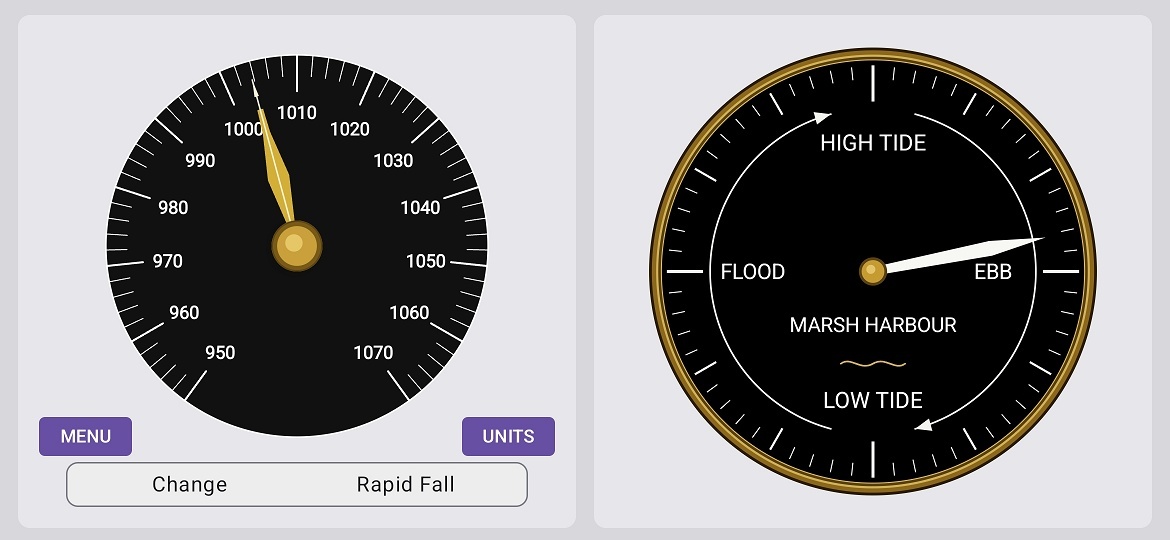
Marine Barometer portrait screen with barometer and altimeter dials
Portrait view

Highlights

Marine Barometer is part of the Virtual Cockpit family, but it is also useful on its own at home, on a boat, in an RV, or while travelling.

[Top]


Download

Current Version: 1.1.9 beta

Click the icon below to download the APK installation file:

Download Marine Barometer APK
Download Marine Barometer

Installation Steps

  1. Tap the download link above.
  2. Open your Downloads folder and tap the APK file.
  3. If prompted, allow installation from unknown sources.
  4. Let Google Play Protect scan the file.
  5. Follow the prompts to complete installation.

Important: This app needs a phone or tablet with a built-in barometric pressure sensor. Many modern Android devices have one, but not all do.

[Top]


Screens

Marine Barometer landscape screen showing larger dials and control buttons
Landscape view

Marine Barometer calibration dialog with fields for known elevation and known pressure
Calibration screen

[Top]


Instructions

Quick Start

  1. Install the app and allow any requested sensor permissions.
  2. Find the elevation of your home, marina, campsite, or other reference location.
  3. Look up the current local sea-level pressure from a reliable nearby weather report.
  4. Open MENU → CALIBRATE and enter the known elevation and known pressure.
  5. Set the altimeter to the same pressure if you want the indicated altitude to match your location.

Everyday Use

A Practical Routine

  1. In the morning, reset the reference needle to the current pressure.
  2. Check the app again a few hours later.
  3. If the live needle is above the reference needle, pressure has risen.
  4. If the live needle is below the reference needle, pressure has fallen.

Notes

[Top]


Theory

What the pressure sensor measures
Your phone's pressure sensor measures the air pressure where the phone is sitting. That is local station pressure, not sea-level pressure.

Why elevation matters
Air pressure decreases with height. To compare pressure at different places, weather services correct local pressure to sea-level pressure. Marine Barometer does the same thing after you tell it the elevation of your location.

What calibration does
Calibration estimates the pressure-sensor error and stores a correction offset. After calibration, the app uses the corrected pressure plus the known reference elevation to compute the live barometer reading.

What the altimeter does
The altimeter does not know your true altitude by magic. It converts pressure into indicated altitude using the barometric setting you enter. If that setting is wrong, the indicated altitude will be wrong too.

What the reference needle does
The reference needle is a trend marker. It does not affect the measurement. It simply remembers an older pressure so you can compare then versus now at a glance.

Reading the trend
A rising barometer often goes with improving weather. A falling barometer often goes with unsettled weather. The size and speed of the change matter, and local geography still matters, so treat the app as one useful clue, not the whole forecast.

[Top]


Finding Your Elevation

To calibrate properly, you need the elevation of the place where the phone is sitting.

Recommended Sources

Using topographic-map.com

topographic-map.com search bar and geolocate button
topographic-map.com geolocate control

Example link to Calgary Airport (YYC)

Click on the link below for an example based on the instructions above for topographic-map.com

Calgary Airport (YYC) Elevation

The easiest way to make one is to open a nearby place once in the browser, then edit the center, zoom, and popup values in the address bar.

[Top]


Virtual Cockpit

Marine Barometer
Part of the Virtual Cockpit project
© 2025-2026 R.M. Moore
virtualcockpitfun@gmail.com

History

Version Date Notes
1.1.9 March 2026 It was compatible with Android 8 and higher.
Updated to code to be compatible with Android 6 and higher.
This will make the app compatible with 99% of devices. Android 6
1.1.8 March 2026 Move reference needle on top of live needle
1.1.7 March 2026 Fine tune live needle
1.1.6 March 2026 Wider gold live needle, narrower reference needle, reset knob on barometer hub
1.1.5 March 2026 Reference-needle reset knob added
1.1.4 March 2026 Larger dial layout merged with reference-needle work
1.1.3 March 2026 Reference needle added; live barometer recompute fixed
1.1.2 March 2026 VSI smoothing revised; reference state persisted; barometer/altimeter separation cleaned up
1.1.1 March 2026 Phase 1 design completed; portrait and landscape layout stabilized

[Top]